
CONSULTING VIA THE CENTER FOR DIGITAL EXPERIENCES
Civian
Making complex investment data easier to compare, explore, and act on.
I worked across research and interaction design on Civian, a platform that helps organizations understand community needs and evaluate the impact of their investments. Eight moderated usability sessions revealed four recurring breakdowns in the decision flow, which we translated into seven interface changes that shaped the product roadmap.
ROLE
UX Research + Interaction Design
TIMELINE
Fall 2024
WHAT I DID
Usability testing · Synthesis · Interaction design · Prototyping
TEAM
4 designers · Civian stakeholders
01 / INTRODUCTION
Civian had the data. The harder question was whether people could use it to make a decision.
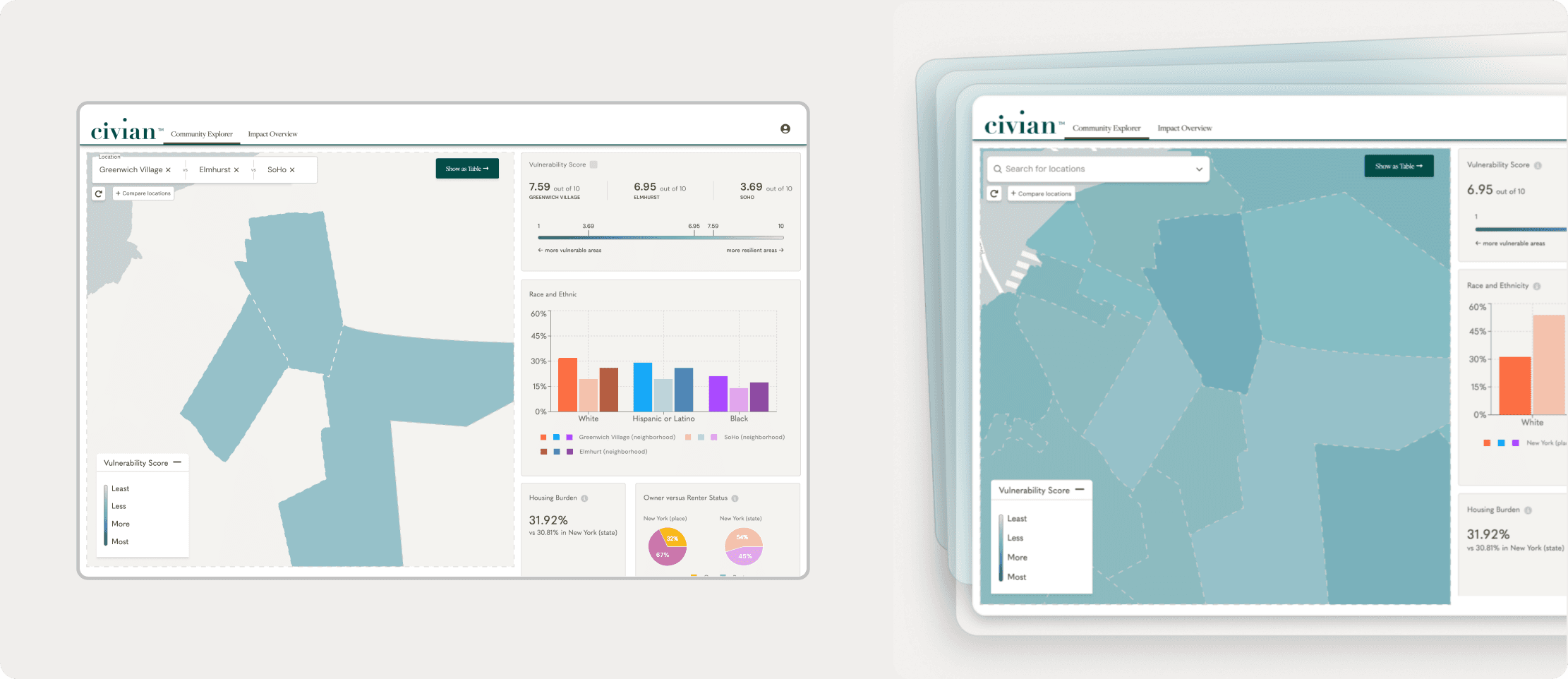
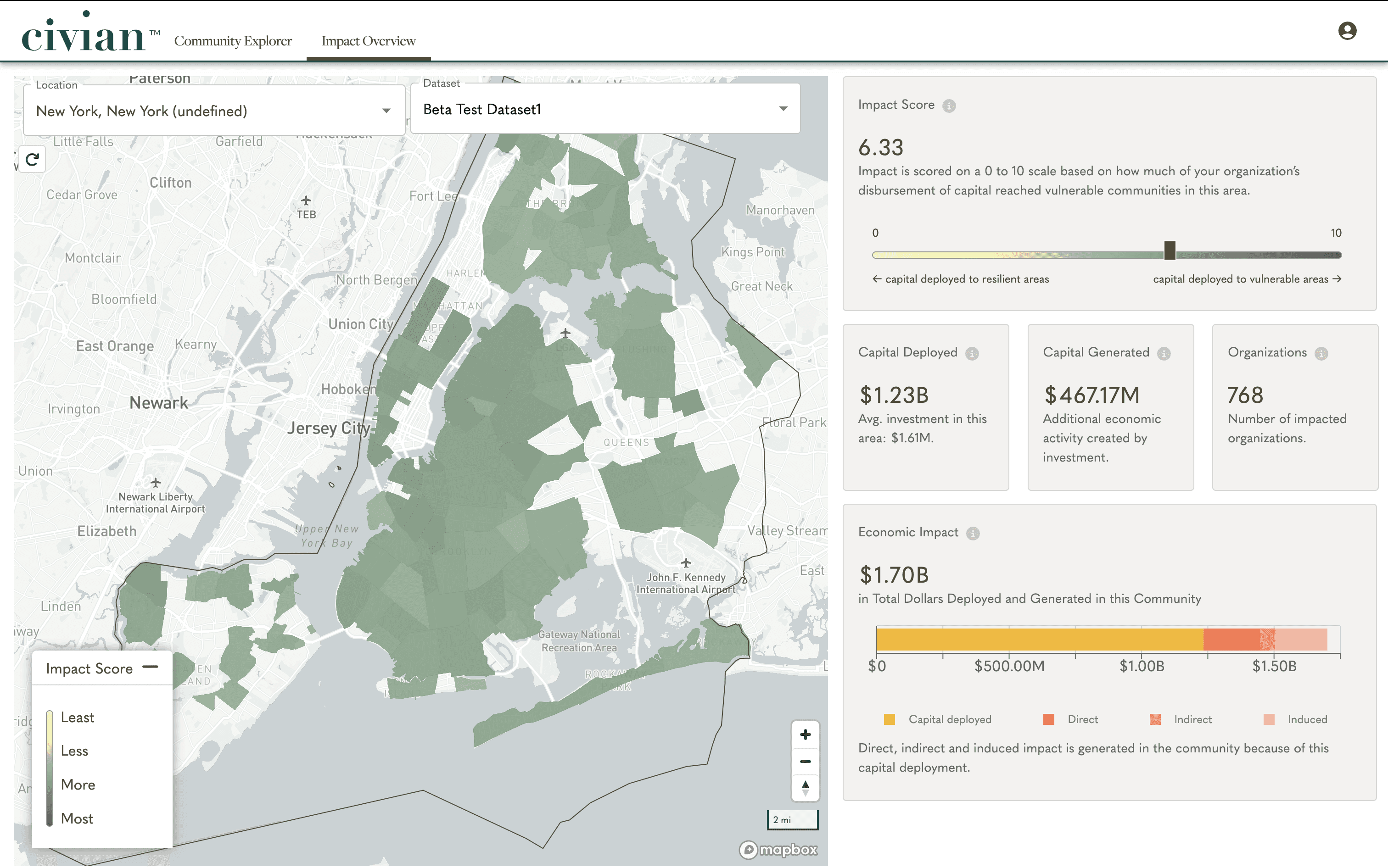
Civian is a data analytics platform for organizations making socially responsible capital investments. Its Community Explorer surfaces socioeconomic and vulnerability data across locations, while Impact Overview shows how an organization’s existing investments are performing.
The product brought a large amount of useful information into one place. Our job was to understand whether prospective users could navigate that information, make sense of it, and ultimately decide where capital could have the greatest impact.

Original Community Explorer dashboard
THE CORE TASK
01 →
Find a community
02 →
Understand the evidence
03 →
Compare alternatives
04 →
Decide where to invest
02 / RESEARCH
We tested the decision-making workflow, not just individual screens.
We conducted 8 remote moderated usability sessions, asking participants to locate communities, interpret impact and vulnerability data, compare potential investments, and explain how they would arrive at a decision.
The sessions also explored whether Civian’s terminology made sense, which information users relied on, where they wanted greater depth, and what additional interaction they expected from the dashboard.
8 participants
Moderated usability testing
Tasks
Explore · Interpret · Compare · Decide
Focus
Comprehension · Navigation · Data utility · Desirability
Would appreciate a way to compare the data, maybe a table or a split screen.
Colors are kinda merging, so confusing.
Had assumed that the first metric was a slider—suggested turning it into a slider filter (for example, sliding to score 2 displays the areas with vulnerability score 2).
It might be clearer if help was broken out into a separate question mark or help link in the top-left corner or at the bottom of the page.
03 / REFRAMING THE PROBLEM
The dashboard surfaced evidence, but users still had to assemble the decision themselves.
The individual issues initially looked separate: users struggled to compare locations, map colors were difficult to interpret, important metrics lacked depth, and help was difficult to find.
Together, they pointed to something larger.
Users repeatedly relied on the same handful of signals—vulnerability, capital deployed, impact, community characteristics—but Civian gave them limited support for connecting those signals across places and turning them into a decision.
Four breakdowns in the flow
Compare
Users had to remember numbers or repeatedly switch between communities.
Read
Map boundaries, colors, and system status were difficult to interpret.
Explore
Users wanted to drill further into metrics and filter the map dynamically.
Orient
Important guidance was hidden when users needed it most.

04 / COMPARE
Comparison shouldn’t depend on memory.
Civian originally showed statistics for one community at a time. To evaluate alternatives, users had to switch repeatedly between locations and remember values themselves. Five participants explicitly wanted a dedicated way to compare communities.
We redesigned the flow around comparison rather than treating it as an edge case.
A dedicated comparison workspace
We introduced a Compare Locations action that lets users bring multiple communities into the same view, inspect key metrics side by side, and move into a tabular comparison when they need greater detail.
The change turns comparison from a workaround into a first-class part of the investment workflow.
Compare locations, inspect side-by-side statistics, and switch to the table view.
05 / EXPLORE
The map needed to help users investigate the data, not just display it.
The map was central to how participants explored Civian, but several details made it harder to interpret. Community boundaries were unclear, the same colors represented different kinds of information, and searches provided little feedback while results were loading.
At the same time, users repeatedly tried to interact with the data more deeply. Six wanted greater detail behind the metrics, while five expected impact and vulnerability scores to behave like filters.
That led to two related shifts.
Make the geography legible
We clarified community boundaries, separated the color systems used for different data types, and added a search loading state so users could understand what the interface was doing.
Clearer boundaries, distinct color systems, and search feedback.
Make the data explorable
We made dashboard metrics more connected to the map. Users could drill into data such as impacted organizations and see those entities geographically, while Impact Score and Vulnerability Score became interactive filters for narrowing the map.
Instead of reading a collection of static indicators, users could use the data to investigate where opportunities existed.
Filter scores and explore organizations directly on the map.
06 / ORIENT
Complex analysis needed help at the moment of use.
Civian already had support content, but it was hidden inside the account menu. Five participants wanted help to be easier to find.
The sessions also exposed a deeper issue: participants sometimes relied on moderator guidance to understand how the different metrics should come together in an investment decision.
So rather than adding more documentation, we brought guidance closer to the work itself.
Guidance where users need it
We surfaced Help directly in the primary interface and introduced contextual onboarding that explains unfamiliar interactions and metrics as users encounter them.
The goal was to reduce the learning curve without interrupting exploration with a long upfront tutorial.
Contextual onboarding brings guidance into the working interface.
07 / OUTCOME
Four usability breakdowns became seven concrete product changes.
8
moderated sessions
4
core experience breakdowns
7
design changes shaping the roadmap
01 / Location comparison
02 / Map boundaries + clearer color system
03 / Search loading feedback
04 / Deeper data exploration
05 / Impact + vulnerability filtering
06 / More discoverable help
07 / Contextual onboarding
The work gave Civian a clearer path from usability findings to product changes, with seven recommendations informing the final product roadmap. More importantly, the redesign shifted the dashboard toward the job users actually came to accomplish: comparing evidence and arriving at an investment decision.
08 / REFLECTION
The strongest findings connected into a product problem.
Evaluative research can easily end as a list of usability issues. What made this project more useful was recognizing the system underneath them: comparison, interpretation, exploration, and guidance were all parts of the same decision-making workflow.
Once we reframed the work around that workflow, the design recommendations became less about fixing individual screens and more about making Civian a better tool for judgment.